
montwave · Dial-in chart
montwave GU2 grind settings
On the montwave GU2, start pour over at 11 clicks, espresso at 6 clicks and French press at 17 clicks. Every other method, with the range to adjust in, is below.
The shape of this dial
The top line is the universal grind index every BrewMark recipe uses. The bottom line is the GU2’s own dial. The connectors show how one maps onto the other.
GU2 grind size chart, by brew method
Start at the recommended setting, brew, then move within the range by taste. Sour or weak means go finer; bitter or harsh means go coarser.
| Method | Setting | Range |
|---|---|---|
| EspressoFine. Aim for a 25–30s shot and adjust from there. | 6 clicksestimated | 5 clicks – 8 clicks |
| Moka potFiner than filter, coarser than espresso. No tamping. | 9 clicksestimated | 8 clicks – 9 clicks |
| AeroPress (short steep)For 1–2 minute recipes. Go coarser for longer steeps. | 10 clicksestimated | 9 clicks – 10 clicks |
| Pour over — V60 / coneThe reference point for most published pour-over recipes. | 11 clicksestimated | 10 clicks – 12 clicks |
| SiphonMedium. Short contact over steady heat, so start here and taste. | 11 clicksestimated | 11 clicks – 13 clicks |
| Pour over — flat bottomKalita, Orea and similar. Slightly coarser than a cone. | 12 clicksestimated | 11 clicks – 13 clicks |
| Steep and release — Clever / SwitchSteep, then drain through a paper filter. If it drains slowly, go coarser. | 13 clicksestimated | 11 clicks – 14 clicks |
| Drip / batch brewAutomatic brewers. Coarser to suit the longer contact time. | 13 clicksestimated | 12 clicks – 15 clicks |
| CuppingMedium-coarse, for tasting side by side. Keep it the same across every bowl. | 13 clicksestimated | 12 clicks – 15 clicks |
| ChemexThe thick filter needs a coarser grind to avoid stalling. | 15 clicksestimated | 13 clicks – 16 clicks |
| French pressCoarse. Too fine here is the usual cause of a muddy cup. | 17 clicksestimated | 16 clicks – 18 clicks |
| Cold brewCoarsest setting you have. 12–18 hours of contact. | 19 clicksestimated | 18 clicks – 20 clicks |
montwave doesn’t publish a brew-method chart we could find, so these are estimated from comparable grinders. If your GU2 reads differently, tell us.
Every grinder on one grind size chart →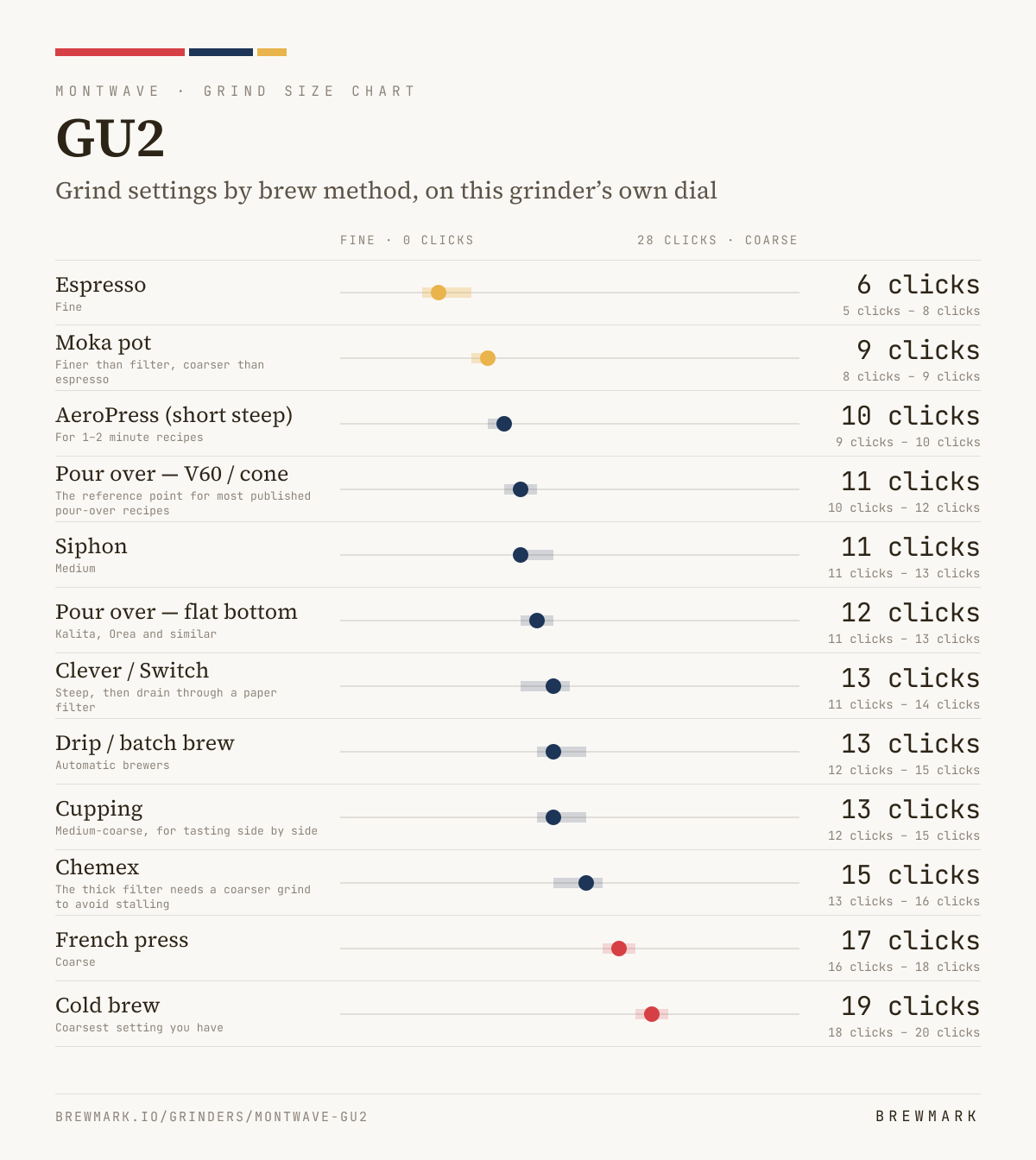
How much room you have to adjust
That is the resolution you actually have to work with on the GU2. Where the number is small, a single step moves the cup more than you would expect — so change one at a time and taste before moving again.
Coming from another grinder?
Convert a grind setting to the GU2
If a recipe quotes a setting for a different grinder, this maps it onto the GU2’s dial using the same curve the chart above is built from.
Converting between two grinders that are not this one? Open the full converter.
Owners’ particle-size readings
No readings for the GU2 yet. If you own one, you can measure your grind with a phone photo; readings are reviewed, then shown here.
How these numbers were worked out
Every grinder gets mapped onto a shared 0–100 grind index, where 0 is espresso-fine and 100 is the coarsest useful setting. Five reference points on the GU2 are placed on that scale — espresso, moka, filter, French press and coarse — and the settings in between are interpolated.
The GU2 joined the catalog in October 2026. montwave doesn’t publish a brew-method chart for it that we could find, so its reference points are estimated by comparison with grinders whose makers do. These numbers are counted from where the burrs just touch, not read off a scale printed on the grinder, so count the same way; the dial may run further than this chart. They are a starting point rather than a specification; if your GU2 reads differently, tell us.
The GU2’s dial is interpolated linearly between those reference points, which is the right model for its burr geometry.
The result is that “medium-fine” resolves to a real number on this grinder rather than a vague instruction. It is a starting point, not a guarantee — burr wear, bean density and roast level all move the target, which is why every row above gives a range as well as a number.
Own a GU2? Tell us your setting
If you’ve dialled in a method on your own GU2, the number you landed on is the best evidence there is. Readings are checked by hand before anything changes here.